 [July- 3rd week tip]
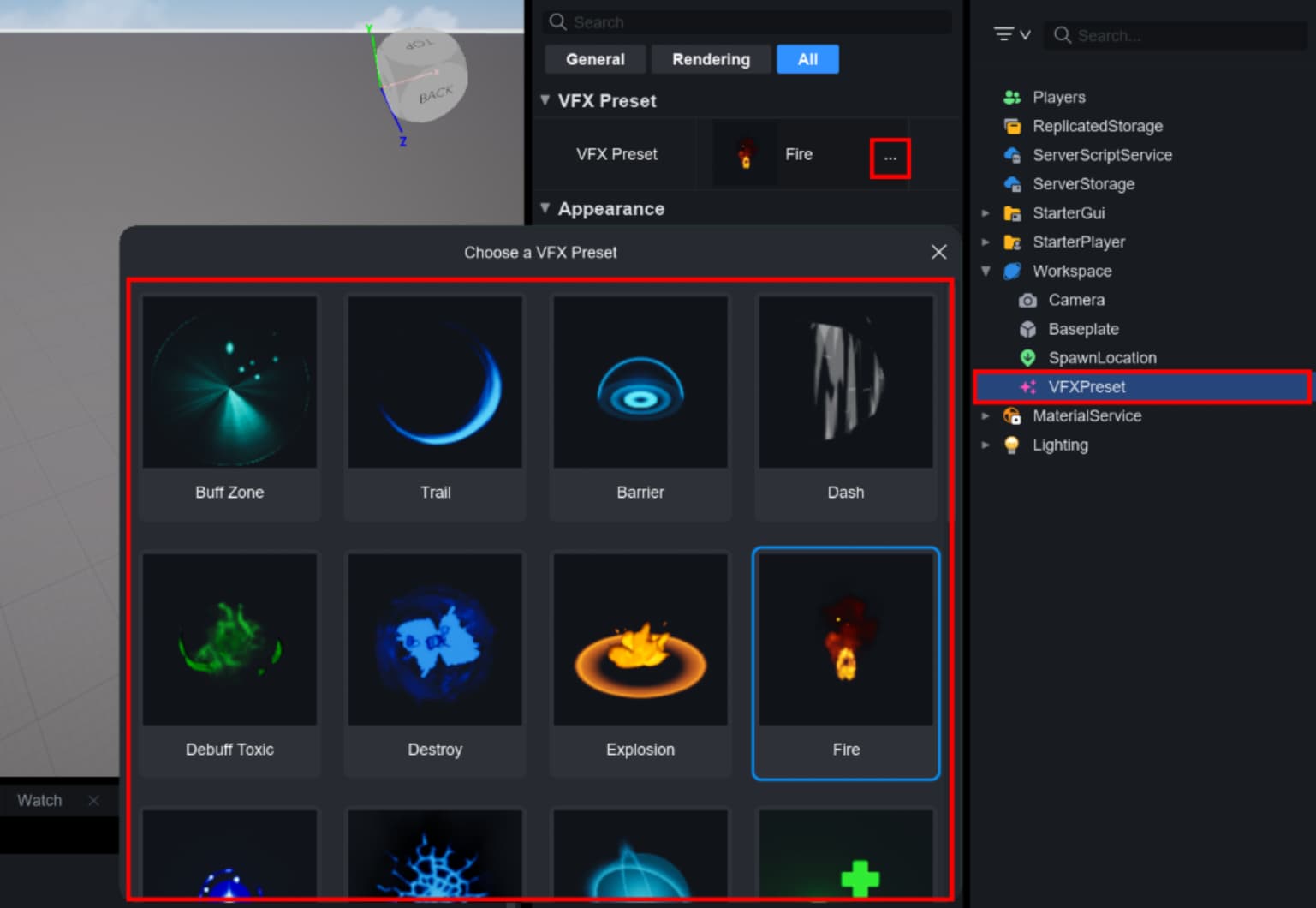
Try using built-in effects like Fire, Heal, Explosion, and more with the VFX preset instance!
 How to use?
-
Place a VFXPreset into your Level Browser.
-
Select it, then in the Properties panel, find the VFX Preset property and click the “…” button.
-
A selection popup will appear — choose your desired effect (e.g., Buff Zone, Trail, etc.), and it will be applied instantly.
 Available Effect
Buff Zone
Trail
Barrier
Dash
Debuff Toxic
Destroy
Explosion
Fire
Get Item
Crack
Guard
Heal
Hit
Hit Object
Blood
Knockback
Landing
Level Up
Muzzle
Portal
Rain
Simple Hit
Spawn
Speedup
Cast
Stun
Warning
 Learn more:
Need a help? Your cavalry’s here!
Happy building!